🎧 Play Along: https://simplejamstudio.com/sketch/34b607c3-7348-4ab9-816c-d47345ec770b
All posts by Telvis
Jam in D flat and experimenting with slash chords
🎧 Play along: https://simplejamstudio.com/sketch/65...
🎹 Build your own: https://simplejamstudio.com
Hey! I'm trying a simple jam with a slash chord. A slash chord is just a regular chord with a specific bass note forced to the very bottom. Here we're using the I with its major third in the bass — so Db becomes Db/F.
Heads up: the grid only shows a little green + on the chord. Click into it, and you'll see it spelled out as Db maj /3. Same thing, two notations.
2-5-1 in four keys, around the cycle of fourths (bass play-along)
Practicing 2-5-1s with SimpleJamStudio. Here's the shared link with the practice track: https://simplejamstudio.com/sketch/4daf5a51-e3d0-4f9e-84fd-7c0e515474cf
I Built My Own Practice Track Generator | simplejamstudio.com Demo
I finally got this project out. Thanks to Claude Code #lol
Here's a shared link with the practice track: https://simplejamstudio.com/sketch/b1707021-8598-42c0-a9af-c1b93795aefc
The horse
I finally got my Fodera after 13 months! It was tricky to EQ. Now I know why most session musicians use a Fender Precision bass. 🙂
I'm experimenting with a new writing process where I write a 4-measure bass line then use Logic Pro instruments to complete the song. It takes me too long to write verse, chorus, bridge and other parts on bass. Hopefully, reducing the work will enable me to complete songs more consistently.
I'm also trying to get better at mixing tracks. I tried out a recommendation to bring all the tracks to -18db before mixing then adjusting beneath that ceiling. Then gain, eq, compression, limit on the stereo out channel. I like how it sounds.
heartbeats
Experimentation with sound effects, pocket bass and drum reverb effects.
Kaggle Credit Risk Competition
Kaggle Competition Goal
Detect which loans are at risk of default using credit application data and 3rd party credit data.
My Approach
Fetch the Kaggle competition data from the Home Credit Default Risk Competition, generate numeric and categorical features then build models using Tensorflow, Scikit-Learn and XGBoost.
Github
See my kaggle_credit_risk github repo to view the source for generating features, training models and running model experiments.
Jumping in the leaves
Inspired by watching a slow-motion video of my kids jumping into a pile of leaves.
The track uses fretted bass in the "lead" track with "Phantom Tremelo" guitar effect. Fretless bass in the "bass" track with a little chorus after the bridge. MIDI Moonlight Ark synths in the background. MIDI Hypnotic Synth arpeggiator and Delicate Bells in the bridge.
Island Temple for Sharon
Song for my wife. Her favorite video game is Zelda, so I put an interpretation of the Overworld theme in the chorus and bridge.
Data 101: MySQL Tutorial using a Diabetes Database
Introduction
This tutorial demonstrates how to use MySQL and MySQL Workbench to create and explore a MYSQL database containing diabetes treatment records.
Original Dataset
I generated the SQL for this tutorial using the Diabetes Data Set from the UCI Machine Learning Repository. I added a "patients" table using random celebrity names.
MySQL Setup
- The raw data for the tutorial is on my github here.
- MySQL Installer : https://dev.mysql.com/downloads/mysql/
- MySQL Workbench Installer : https://dev.mysql.com/downloads/workbench/
Connecting to the Database
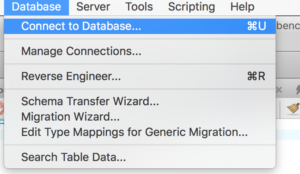
Open MySQL Workbench. Click Database -> Connect to Database
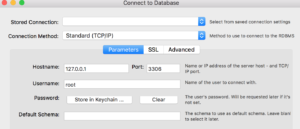
The local MySQL server should be running on Hostname: 127.0.0.1 and Port 3306. Your hostname or IP address may be different if you are connecting to another host running MySQL. Click on “Password” to enter the password generated during installation.
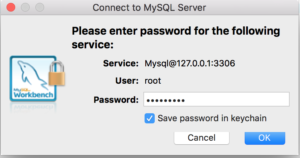
Save the password here:
Now that you connected to the server, list the installed databases using.
SHOW SCHEMASYou should see the following output similar to this:
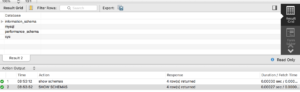
Creating the Diabetes Database
In MySQL workbench, execute “create_diabetes_db.sql” using “File -> Open SQL Script”.
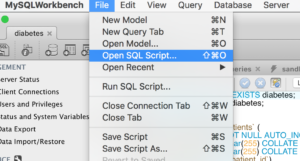
You can find this file in my github within the medical_databases/sql/ directory.
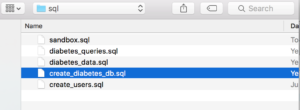
Once the file is open, use Command-A to “Select ALL” - or (Edit -> Select ALL).
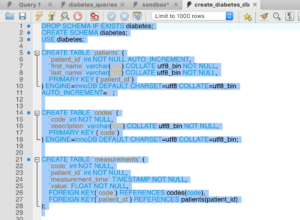
Now Click the Execute (leftmost lightning bolt) button. The “Action Output” window should show:

Loading the Diabetes Data into the Database
Now open “diabetes_data.sql”. Click here to download that file from github.
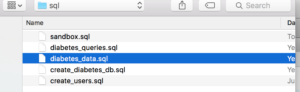
Once the file is open, use Command-A to “Select ALL” - or (Edit -> Select ALL). This is a big file so you’ll only see the beginning part in the window.
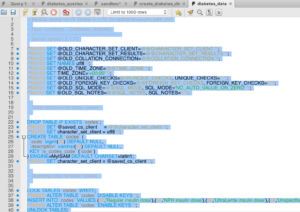
Now Click the Execute button (leftmost lightning bolt). The “Action Output” window should show something similar to the output below. There are lot of commands in this file but you should see some “CREATE TABLE” and “INSERTS” statements.

Now create a new “Query Tab”. (File -> New Query Tab) or COMMAND-T then try the query:
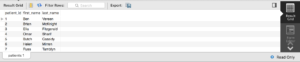
SELECT * FROM patients;
The result grid pane should show something similar to the following.